


Upwork
3.63.71K Reviews
App Specs
- Version
- 2.11.0
- Updated On
- License
- Free
- Downloads
- 10,000,000+
- Developer
- Upwork Global Inc.
- Categories
- Business
- Platform
- Android, iOS
Screenshots
 Analysis by AppCompare
I see Upwork as a mobile doorway into a working marketplace, not a shortcut to instant income or an automatic way to find the perfect hire. The app is free to download, and that makes it easy to explore before deciding whether its style suits you. The real value comes from how thoughtfully you use it: a clear profile, a well-defined project, and careful communication matter more than simply being present.
What the free access does—and does not—tell you
Upwork is a free Business app from Upwork Global Inc., and it is rated for Everyone. Free access is a useful starting point for freelancers who want to look for opportunities and for clients who want to begin finding independent talent. I would not treat “free” as a promise that every part of working through the marketplace has no cost; the fact that the app itself is free does not, by itself, establish the full financial terms of hiring or earning.
That distinction is worth keeping in mind before you commit to a project. I’d use the app to understand the available work, compare potential candidates, and communicate about scope, then read the terms shown for the specific arrangement before making a financial decision. If you are comparing platforms, compare the complete cost of the work—not just whether you can install the app without paying.
Where the value comes from
The strongest value is access to a shared space where clients and freelancers can discover one another and discuss work. For a small business owner, that can be more practical than relying only on personal referrals when a project calls for a skill that is not needed every week. For a freelancer, it gives a way to present a professional profile and respond to opportunities without building a separate job-search system from scratch.
That convenience is most useful when you already know what you need. A client who can describe the deliverable, deadline, and expected communication style is in a better position to judge proposals than someone posting a vague request. Likewise, a freelancer who can point to relevant experience and explain their approach gives a potential client more to assess than a broad claim of being able to do everything.
The marketplace approach also has a trade-off: browsing and applying can take real effort, and a listing is not a guarantee of work. I would treat time spent searching as part of the cost. Rather than sending the same pitch everywhere, shortlist a few jobs that genuinely fit, then tailor each proposal to the client’s stated needs. That is a more deliberate use of the app than chasing every new posting.
Using the marketplace with a clear plan
I’d start this section by treating Upwork as a place to make deliberate choices, rather than a feed to check whenever you have a spare minute. I’ll focus on how a small plan can help you judge whether a project or opportunity deserves your time, while keeping the next section’s practical onboarding advice in view.
Worth Reading Before You Choose

Flipboard Shows What News Apps Must Do Beyond the Feed

Switching to Android Auto Means Rethinking Your Driving Routine

Google Calendar Makes a Crowded Week Easier to Manage

Ludo King Makes the Most of the Minutes Between Plans

Baby Panda World Brings Quick Play to Modern Phones, but Its Game Library Feels Busy

ESPN’s Live Game View Makes Following Close Games Easier
Get Started with Ease
Jumping into Upwork is like opening the door to a global marketplace of talent and opportunities. Setting up an account is straightforward. You can either sign up as a freelancer looking for gigs or as a client in need of services. I found the onboarding process simple, with guided steps to create a profile that stands out. Trust me, first impressions matter here!
The app’s interface is clean and intuitive, which makes navigation a breeze. Everything from job postings to profile settings is just a tap away. For freelancers, crafting a profile that highlights your skills and experience is crucial. The app offers tips on how to make your profile pop, which I found super helpful.
One practical way to improve that first impression is to make the profile specific rather than simply long. If you write, design, or provide another service, show the kind of problem you can solve and the sort of finished result a client should expect. A focused profile helps you decide which jobs to pursue, too: if a posting does not match the work you want to show, it may not be worth spending time on a proposal.
Searching and Bidding for Jobs
Once your profile is all set, the real fun begins. Browsing through job postings is addictive. You can filter jobs by category, pay rate, and more. I love how you can save interesting jobs for later, making it easier to manage potential gigs.
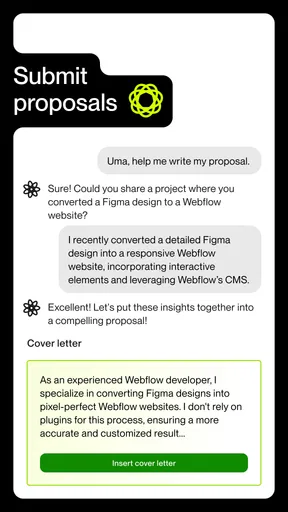
Bidding on jobs is where the competition kicks in. You’ll need to send proposals to potential clients, explaining why you’re the best fit for the job. The process can feel a bit like online dating, but with practice, it gets easier. A little tip from me: personalize each proposal to stand out from the crowd.
Saved jobs are especially useful as a decision tool, not just a bookmark pile. I’d review them together later and compare the scope, fit, and questions each one raises before applying. This helps avoid rushed bids made just because a listing caught your eye. In a proposal, I’d address one concrete detail from the brief and ask a concise question if something important is unclear; that shows attention without promising work before the scope is understood.
Managing Projects and Payments
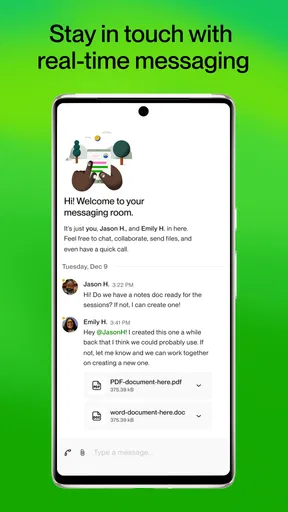
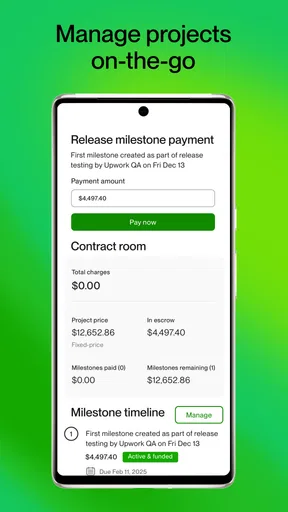
Once you land a gig, Upwork makes it easy to stay on top of your projects. The app has built-in messaging to keep communication seamless between you and your client. I found this feature essential for clarifying project details and deadlines.
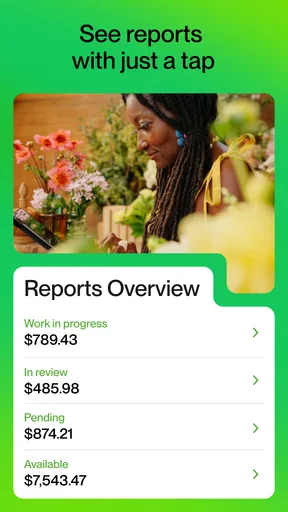
When it comes to payments, security is a big deal. Upwork’s payment protection gives you peace of mind. Clients fund projects before work begins, ensuring you get paid for your hard work. The app also tracks hours if you’re working on an hourly basis, which I found super convenient.
For an everyday example, imagine a shop owner who needs a product description revised before a seasonal promotion. They can use the marketplace to find a writer, discuss the audience and length in messages, and confirm what counts as a finished draft before work starts. The writer, in turn, can keep the agreed deadline and questions in one conversation. The key lesson is to make the deliverable concrete in advance; a chat thread is helpful, but it cannot rescue a project whose expectations were never clear.
Freelancers should also think about whether a task is better suited to hourly or fixed-scope work. If the requested result is easy to define, agreeing on a bounded deliverable can keep expectations aligned. If the work may change as the client reviews progress, an hourly arrangement may make more sense. I would settle that choice, along with milestones or review points where relevant, before starting rather than trying to sort it out after effort has already been spent.
Community and Support
A standout feature of Upwork is its community. The app hosts forums where freelancers can share tips, ask questions, and support each other. It’s like having a team of cheerleaders rooting for your success from all over the world.
If you run into any issues, Upwork’s support is just a click away. I had a couple of questions during my time with the app, and the support team was prompt and helpful. It’s reassuring to know help is available when you need it.
Community advice can be a useful reality check, especially when you are new to proposals or setting boundaries with clients. I would still treat other users’ experiences as perspectives, not rules that apply to every contract. A tactic that works for one kind of project may not suit another, so compare advice with the actual brief and the terms attached to your own work.
How it compares with other ways to find work
Compared with a personal referral, a marketplace can make it easier to discover people beyond your existing network, but it also asks you to evaluate profiles and proposals without the reassurance of a trusted introduction. Compared with a general job board, Upwork is oriented around connecting clients and freelancers for project work, so it can fit short engagements or specialist tasks better than someone seeking a conventional employee role.
It is not automatically better than direct outreach. If you already have a dependable network, or your work depends on close, long-term local relationships, asking for referrals may be more efficient and personal. A marketplace is more compelling when you need a wider pool, want a single place to discuss a project, or are testing demand for a freelance service. I’d choose based on the kind of relationship the work requires, not on the assumption that one channel always wins.
For a client, the main comparison is not simply “hire here or hire elsewhere.” It is whether the project is defined well enough to evaluate candidates fairly. When the brief is sensitive, highly specialized, or dependent on ongoing collaboration, a referral or a direct professional relationship may make the selection process easier. For a clearly bounded task, browsing a broader pool can be worth the added screening.
Who is likely to get the most from it?
I’d recommend trying it if you are comfortable presenting your work, judging opportunities carefully, and communicating details in writing. It may suit independent professionals who want another route to reach potential clients, as well as small teams that need occasional help without treating every task as a permanent hire. The app has a 3.7 average from around 222,000 ratings, and it has passed 10 million installs, so it is a well-used option—but those figures do not tell you whether a particular job or client will be a good fit.
Someone who expects guaranteed assignments, dislikes pitching, or needs predictable income immediately may find the freelancer side frustrating. Clients who want a hire chosen for them without reviewing candidates may also prefer a recruiter or a personal recommendation. Upwork is a meeting place, not a substitute for making a sound hiring decision or building a reliable pipeline of work.
As of version 2.8.2, the app requires Android 10 or later. If your device runs an older Android version, that requirement is a practical reason to check compatibility before planning to use the mobile app. The service itself is also accessible through the broader Upwork platform, so people who prefer to do detailed writing or compare many candidates on a larger screen may find a computer more comfortable for some steps, while keeping the app handy for messages and quick checks.
Final Thoughts
Wrapping it up, Upwork is a solid platform for freelancers and clients alike. It’s not just about finding work or hiring talent; it’s about building connections and growing professionally. Whether you’re a seasoned freelancer or a newbie, this app offers a world of possibilities right at your fingertips.
So, if you’re ready to dive into the freelance world or need a project done with precision, give Upwork a shot. You might just find your next big opportunity!
My practical verdict is to try it when the marketplace solves a real problem for you: reaching clients outside your circle, or finding a specialist for a clearly scoped task. Since the app is free, exploring it does not require an upfront purchase, but your time and the terms of any work still matter. I would skip it if you expect effortless matches or guaranteed earnings, and I would compare other channels when referrals, a conventional job, or a long-term local relationship better fits what you need.
Pros
- Wide range of job categories available.
- User-friendly interface for easy navigation.
- Secure payment protection for freelancers.
- Robust profile customization options.
- Flexible work schedules and remote opportunities.
Cons
- High service fees for freelancers.
- Intense competition for popular jobs.
- Limited support for dispute resolution.
- Complex application process for new users.
- Some job postings lack clear requirements.
FAQs for Upwork
What is Upwork and how does it work?
Upwork is a platform that connects freelancers with clients seeking various services, such as writing, graphic design, and programming. Users can create profiles, apply for jobs, and communicate with clients directly through the app. It facilitates project management and payment processing, making it easier for freelancers to find work and for clients to hire talent.
Is Upwork free to use for freelancers?
While creating a profile and browsing job listings on Upwork is free, freelancers should be aware that Upwork charges a service fee on their earnings. This fee is typically a percentage of the freelancer’s earnings from each client, starting at 20% for the first $500 billed with a client and decreasing over time.
How do I get paid on Upwork?
Freelancers on Upwork can receive payments through several methods, including direct bank transfer, PayPal, and Payoneer. Upwork offers an escrow system to ensure secure transactions, where clients deposit funds before a project begins, and funds are released once the client approves the work. This provides security for both parties.
Are there any requirements to join Upwork?
To join Upwork, freelancers must create a profile showcasing their skills, experience, and portfolio. The platform reviews each application, and approval depends on the freelancer’s expertise and the demand for their skills. A complete, professional-looking profile increases the chances of being accepted and attracting clients.
How can I improve my chances of getting hired on Upwork?
To improve your chances of getting hired on Upwork, focus on building a strong profile that highlights your skills and experience. Regularly update your portfolio with relevant work samples and ensure your profile is complete and professional. Actively apply to jobs that match your expertise and tailor your proposals to each client’s needs.


